
.png?fit=max&auto=format&n=fTXEPIUfjW4rC1Pi&q=85&s=85d7b852879d29ad2bde9b743307ab0e)
Documentation Index
Fetch the complete documentation index at: https://docs.simplifi.work/llms.txt
Use this file to discover all available pages before exploring further.
The Simplifi API is in Developer Preview. While not all features are finalised, we encourage you to explore and share your feedback — including thoughts on endpoint design, response structure, or areas where documentation could be clearer.
Overview
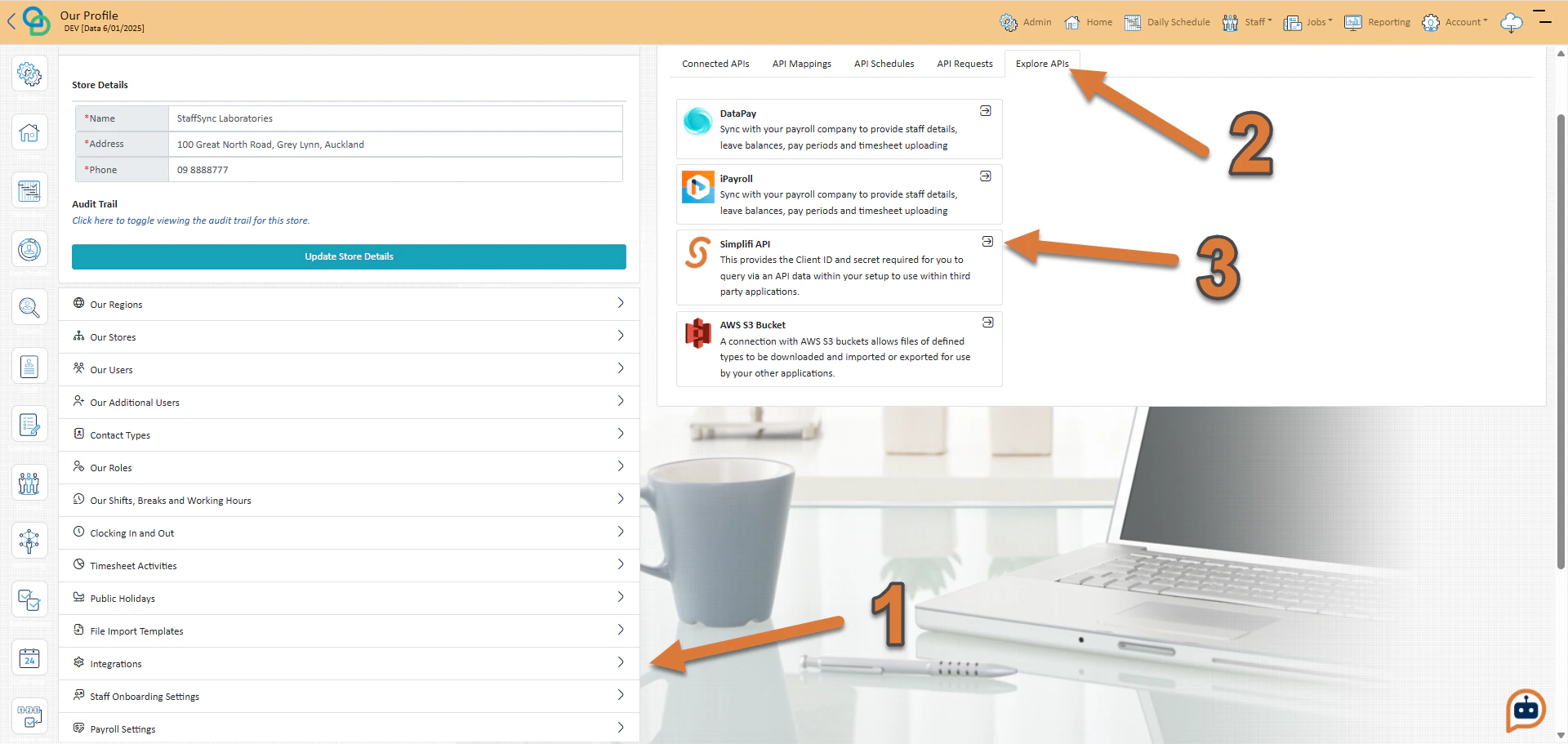
The Simplifi API authenticates using OAuth 2.0 with the client credentials grant flow. This is a machine-to-machine flow designed for server-side integrations. Your server exchanges a Client ID and Client Secret for a short-lived access token (1 hour), which is then used to authenticate the API request. To obtain your Client ID and Client Secret:- Press Integrations under Our Profile
- Press Explore APIs
- Press the select button for the Simplifi API
Tokens
OAuth 2.0 works by passing your Client ID, Client Secret to the authentication server in exchange for a short-lived access token. This token represents your application and must be included in the Authorization request headers of every API request. When a token expires, simply repeat the authentication request to receive a new one. We recommend that you build a token manager in your application that caches the token and automatically re-authenticates when a 401 response is received.JSON Response
A successful authentication request returns a JSON response like this:JSON