.png?fit=max&auto=format&n=fTXEPIUfjW4rC1Pi&q=85&s=85d7b852879d29ad2bde9b743307ab0e)
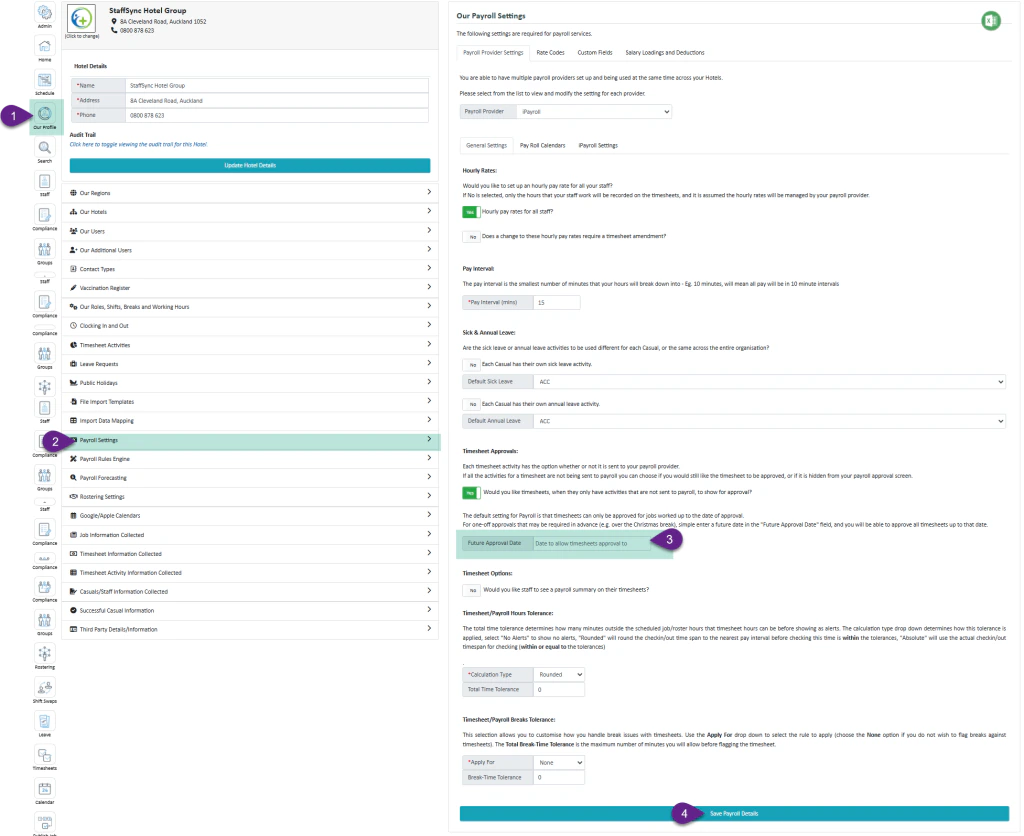
In some situations, managers may need to approve timesheets in advance. Simplifi generates timesheets on the current day, but you can configure it to create timesheets for future dates.Documentation Index
Fetch the complete documentation index at: https://docs.simplifi.work/llms.txt
Use this file to discover all available pages before exploring further.
Permission Required
Only users at the head office with access to organisation settings can perform this action.Steps to Generate Future Timesheets
- Select “Our Profile”
- Select “Payroll Settings”
- Enter the Desired Date – enter the date up to which you want future timesheets generated
- Select “Save Payroll Settings”