
.png?fit=max&auto=format&n=fTXEPIUfjW4rC1Pi&q=85&s=85d7b852879d29ad2bde9b743307ab0e)
Documentation Index
Fetch the complete documentation index at: https://docs.simplifi.work/llms.txt
Use this file to discover all available pages before exploring further.
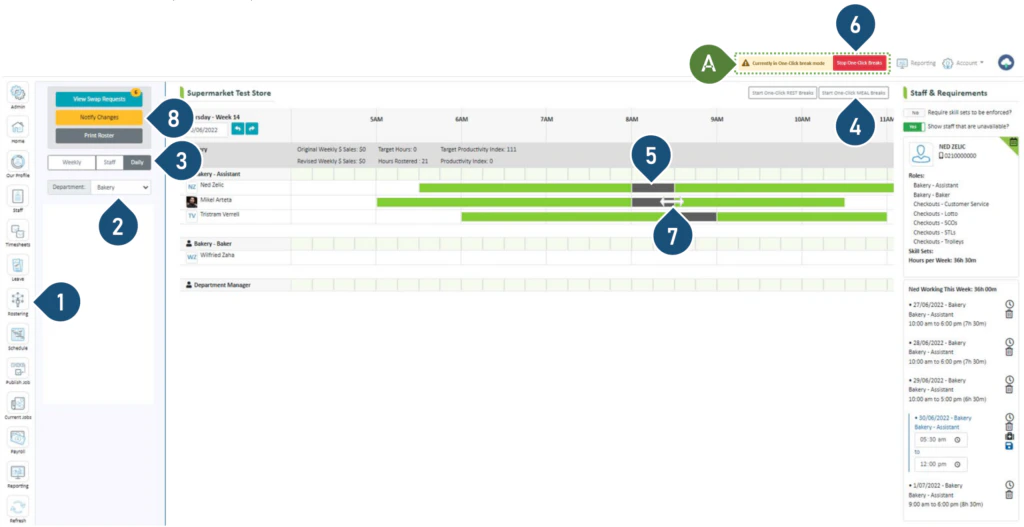
- Select the Rostering button.
- Select the Department.
- Select the Daily view.
- Select Start One-Click Meal Breaks.
- To add or move a meal break, click on the shift bar where you wish to insert the break or move it to.
- To remove a meal break, click on the break on the shift bar.
- Once the break has been inserted or removed, click on Stop One-Click Breaks.
- To extend the meal break (e.g. from 30 mins to 1 hour), hover the mouse over the end of the break and drag it to the new finish time.
- Click Notify Changes to send a notification to the staff member with roster changes.
Note: When extending the meal break, the shift finish time will also be extended